Information Technology (IT) Resume Sample - How to Write, Examples
By Naukri Team, 18 Apr, 2023
Copy to clipboard
This article offers expert tips, a comprehensive guide, and a sample IT resume to highlight skills and experience effectively. It covers writing a concise resume summary, emphasizing core skills and achievements, matching job descriptions, and providing clear contact information. Lastly, education and projects/accomplishments sections making your IT resume stand out to potential employers.
Create your own resume from the template
Table of Content:
How to Format an IT Resume
IT Resume Summary and Objective
How to Describe Your Work Experience on Information Technology Resume
Motivated IT support professional with strong technical troubleshooting skills and internship experience in desktop support and network maintenance. Seeking to leverage technical expertise and certification to contribute to organizational IT infrastructure.
Full-stack software developer with 4 years of experience in developing scalable web applications and implementing innovative software solutions. Proven track record of delivering high-performance software projects using modern technologies and agile methodologies.
Professional Experience
Software Developer | TechInnovate Solutions, Bangalore Jan 2022 - Present
Developed microservices architecture reducing system response time by 40%
Implemented CI/CD pipeline, improving deployment efficiency by 60%
Created RESTful APIs using Node.js and Express
Collaborated with cross-functional teams to deliver complex software projects
Junior Software Engineer | Global Tech Systems, Bangalore June 2020 - Dec 2021
Developed and maintained frontend applications using React
Implemented robust error handling and performance optimization
Participated in code reviews and mentored junior developers
Contributed to open-source projects
Skills
Programming Languages: JavaScript, Python, Java
Frameworks: React, Node.js, Django
Cloud Platforms: AWS, Google Cloud
Database: MongoDB, PostgreSQL
DevOps: Docker, Kubernetes
Version Control: Git
Education
Master of Technology in Software Engineering
Indian Institute of Technology, Bangalore 2018-2020
Strategic cloud solutions architect with 8+ years of experience designing and implementing enterprise-level cloud infrastructure. Expert in multi-cloud strategies, digital transformation, and driving technological innovation across complex IT environments.
Implemented containerization strategies using Kubernetes
Developed disaster recovery and business continuity plans
Optimized cloud resource allocation
Conducted cloud security audits and compliance checks
Key Achievements
Speaker at Cloud Computing Conference 2023
Published cloud architecture articles in tech journals
Created award-winning cloud migration methodology
Skills & Expertise
Cloud Architecture Design
Multi-Cloud Strategy
Cloud Security
DevOps Integration
Enterprise Architecture
Cost Optimization
Education
Post Graduate Diploma in Cloud Computing | NIIT
B.Tech in Computer Science | Delhi Technical University
Certifications
AWS Certified Solutions Architect
Google Cloud Professional Cloud Architect
Microsoft Azure Solutions Architect Expert
How to Format an IT Resume
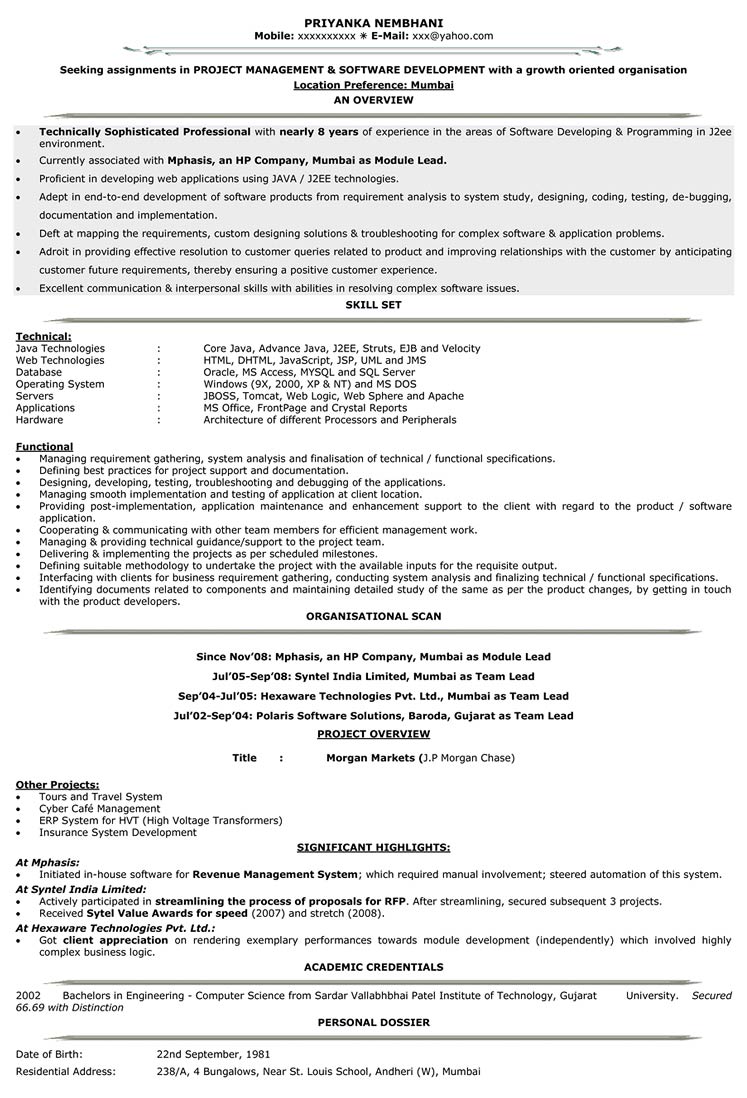
In today's digital era, the demand for skilled Information Technology (IT) professionals continues to soar. However, standing out from the competition in the competitive IT job market requires a well-crafted resume that showcases your technical expertise and accomplishments effectively. A powerful IT resume can open doors to exciting career opportunities in various sectors such as software development, cybersecurity, network administration, and more. This article provides a comprehensive guide on how to create a compelling IT resume that highlights your skills, experience, and achievements. Along with expert tips and insights, we will also present an Information Technology Resume sample to illustrate the key elements and the ideal IT resume format.
Samir
Visionary, Strategist & Achiever with over 15 years of multi-cultural experience in Software Delivery Management & Automation, IT Transformation, DevOps Management, IT Operations, with excellence in performing incubation & transition of CoEs/Teams.
A Visionary leader with specialization in Legacy Migration & Modernization Strategy, Digital Cloud Transformation Roadmaps to gain insights and capitalize, Cloud Native Architectures, experience and insight to elevate any application, computing platform infrastructure to Cloud
Incisive experience in developing IT roadmap to optimize resources within the organization through technology optimization and shared services model
Change Agent in designing & implementing technical solutions that reduce TCO and deliver a strong ROI
Excels in managing Oracle retail products contributing to the USD 40+ Billion organization
Established Shared Service Model for managing & delivering optimized technology services
Recognized for building cloud-optimized architectures, developing business strategies and influencing product roadmap by working closely with Cloud Engineering Teams
EDUCATION HISTORY
Post Graduation
CourseMBA/PGDM( International Business )
CollegeIndian Institute of Management, Tiruchirappalli
Year of Passing2009
Graduation
CourseB.Tech/B.E.( Computers )
CollegeSRM university (SRMU)
Year of Passing1994
WORK EXPERIENCE
Mar 2010 to Present
President at Infosys
Implemented the containerization strategy to build the environments on-demand basis to reduce to compute cost
Spearheaded CI/CD & DevSecOps processes to improve the stable code deploys and predictable installs
Automated the code delivery process thus by reducing delivery timelines from 5 days to 1 day per release
Fostered innovation with-in the team, which resulted 60% of resource time savings on routine tasks
Enabled automation programs to achieve zero outages and reduction in rework from 22% to 7%.
Sep 2007 to Sep 2010
Director at Meta Investments
Implemented 80% CPU compliance program; took various enterprise initiatives like Quality, Kaizen & DBA COE
Established onshore / offshore DBA set-up
Developed DBA COE with 60 DBAs with a long-term vision; enabled economy of scale leverage to the business units in providing strategic excellence
Restructured DB Artisan tool usage which results in INR 5 M savings per year
Achieved Zero outages & No. Sev 1/ 2 / 3 tickets and implemented a strategy for 10% reduction in Sev 7 tickets
Oct 2001 to Sep 2007
Manager at Tata Consultancy Services (TCS)
Achievements
BC & CPU projects
Awarded OS A for completing BC & CPU projects within specified time & Budget
Value Champion Award
Awarded with Value Champion Award for promoting Fidelity values through Innovation program
IT Resume Summary or Objective
The resume summary or objective serves as a brief introduction to your IT skills and expertise. Tailor this section to align with the specific job you're applying for and highlight your most relevant qualifications. Here's a guide on how to write a compelling IT resume summary:
1. Keep It Concise: Your IT resume summary should be a brief and focused paragraph, ideally consisting of 3-4 sentences. Avoid lengthy explanations and stick to the most relevant points. 2. Highlight Your Core Skills: Begin your summary by mentioning your primary IT skills and areas of expertise. These are the key qualifications that make you suitable for the role. Tailor your skills to match the specific job description. 3. Mention Years of Experience: State the number of years you've worked in the IT field. Whether you're a seasoned professional or an entry-level candidate, mentioning your experience level provides context for the hiring manager. 4. Showcase Achievements: Use quantifiable achievements to demonstrate your impact in previous roles. Mention specific accomplishments that showcase your abilities and potential contributions to the new position. 5. Match the Job Description: Analyze the job posting and identify the keywords and requirements the employer is seeking. Incorporate these keywords into your summary to show that you align with their needs. 6. Express Your Career Goals: Briefly mention your career goals and how they align with the company's mission. This helps employers see your long-term commitment and how you can contribute to their success. 7. Write in the First Person: Use the first-person point of view to create a personal connection with the hiring manager. This approach feels more engaging and authentic.
How to Describe Your Work Experience on Information Technology Resume
When writing the work experience section of your IT resume, it's crucial to focus on your relevant job roles and showcase your key achievements and contributions. Here's a guide on how to effectively present your work experience:
1. Format:
• List your work experience in reverse-chronological order, starting with your most recent position first. • Include the job title, company name, location, and employment dates for each role.
2. Job Description:
• Provide a brief overview of your role and responsibilities in the position. • Emphasize your primary job functions related to IT and any specializations within the field.
3. Key Achievements:
• Highlight your accomplishments and contributions during your time in each position. • Use quantifiable metrics and data whenever possible to demonstrate your impact.
4. Relevant Technologies:
• Mention the technologies, tools, and programming languages you utilized in each role. • Focus on the ones most relevant to the job you're applying for.
Example:
Software Developer, ABC Software Solutions • Developed and maintained web applications using Java, resulting in a 30% increase in website performance. • Led a team of 5 developers in designing and implementing a customer relationship management (CRM) system, which streamlined communication and boosted client satisfaction by 25%. • Collaborated with cross-functional teams to identify and resolve software defects, reducing bug count by 40% within three months.
How to Correctly Display Your Contant Information
Contact information is a crucial element of your resume as it allows potential employers to get in touch with you easily. When writing your contact information, follow these guidelines to ensure it is clear, professional, and accessible:
1. Placement: Place your contact information at the top of your resume, either in the center or aligned to the left or right margin. This ensures it's one of the first things recruiters see. 2. Full Name: Begin with your full legal name. Use a slightly larger font size than the rest of the resume to make it stand out. 3. Professional Email Address: Provide a professional email address that includes your name, preferably on a well-known domain like Gmail. Avoid using unprofessional or quirky email addresses. 4.Phone Number: Include a reliable phone number where employers can reach you. Double-check that the number is correct and functioning. 5. LinkedIn Profile (Optional): If you have a well-maintained LinkedIn profile relevant to your professional career, consider including a link. Ensure your profile is professional and up-to-date. 6. Location (Optional): You can add your city and state or country, but it's not mandatory, especially if you're open to relocation. 7. Formatting: Use clear and readable fonts for your contact information, and consider using bold or a different font color to make it visually distinct. 8. Privacy Considerations: You don't need to include personal details like your home address, date of birth, or social security number. These are unnecessary and may raise privacy concerns.
Soft skills and hard skills are both important components of an IT resume. Soft skills refer to personal attributes and interpersonal abilities, while hard skills represent technical and specific knowledge related to the IT field. Including a combination of both in your resume showcases a well-rounded skill set. Here are some examples of soft skills and hard skills that you can include in your IT resume:
Soft Skills
Hard Skills
Communication
Programing Language
Problem Solving
Database Management
Adaptability
Operating System
TeamWork
Web Development
Team Management
Network Administration
Customer Service
Data Analysis
List Your Projects and Accomplishment Correctly
When including projects and accomplishments in your resume, it's important to showcase your skills, expertise, and contributions to previous roles or personal initiatives. Here's how to effectively present projects and accomplishments in your resume:
1. Project Descriptions:
• Provide Context: Briefly introduce the project, mentioning the project's name, the purpose, and the team involved (if applicable). Describe the project's scope and objectives. • Highlight Your Role: Clearly state your role and responsibilities in the project. Emphasize the specific skills and technologies you utilized during the project. • Achievements: Describe the outcomes and results of the project. If possible, use quantifiable data and metrics to demonstrate the project's success or impact. • Challenges and Solutions: Mention any challenges faced during the project and how you and your team overcame them. Highlight your problem-solving and adaptability skills.
2. Accomplishments:
• Quantify Results: Whenever possible, quantify your achievements with specific numbers, percentages, or data. This adds credibility to your accomplishments. • Focus on Impact: Highlight how your contributions positively impacted the organization, team, or project. Emphasize your value as an employee.
Example:
• Created a mobile application for real-time weather updates, with over 10,000 downloads on the Google Play Store. • Received the "Innovator of the Year" award for developing an automated testing framework, reducing testing time by 60%.
List Your Education Details
Mention your highest educational qualification, along with any certifications or relevant courses you've completed in the IT domain. Include the name of the institution, degree obtained, and graduation year
Example:
Bachelor of Science in Computer Science XYZ University, Anytown, USA | May 2019
Conclusion
Crafting an impressive Information Technology resume requires careful attention to detail, a focus on relevant technical skills, and an emphasis on quantifiable achievements. By tailoring your resume for each job application and using industry-specific keywords, you can increase your chances of getting noticed by potential employers and securing your dream IT job. Remember, your resume is your first opportunity to showcase your abilities, so make it count! Use the information and sample provided in this article as a guide to create a powerful IT resume that sets you apart in the competitive IT job market.
Include your contact information, a compelling resume summary, relevant technical skills, work experience with key achievements, education details, certifications, and any notable projects or accomplishments.
Should I include non-IT related work experience on my IT resume?
If the non-IT experience demonstrates transferable skills or accomplishments relevant to the IT field, include it briefly. Otherwise, focus primarily on your IT-related roles and achievements.
How do I showcase my technical skills effectively?
Create a dedicated "Technical Skills" section, listing relevant programming languages, software, tools, and other IT competencies. Use bullet points for clarity and be specific about your proficiency level.
Should I include a cover letter with my IT resume?
Yes, a well-crafted cover letter is beneficial as it allows you to expand on your qualifications and demonstrate your enthusiasm for the position. Use it to explain why you are a strong fit for the role.
Should I use a specific resume format for my IT resume?
Stick to a clean and professional resume format. A chronological format (reverse-chronological order) is commonly used for IT resumes as it highlights your most recent and relevant experience.
Important Links:
Your career deserves the best start. Begin your career journey with Naukri's Resume Maker - the smarter way to create a professional resume that stands out. Alongwith Resume maker service, dive into expert Career Advice, and discover career tips, guidance, and growth insights on Naukri Career articles.
Buy Safely with Naukri.com We support secure payment methods
Disclaimer
While Naukri FastForward services have helped many customers over the years, we do not guarantee any interview calls or assure any job offers with any of our services. The services associated with NaukriFastforward are only provided through the website Naukri.com. You are advised to be cautious of calls/emails asking for payment from other web sites that claim to offer similar services under the name of Naukri.com. We have no associates/agents other than the partner sites that have been specifically named on the homepage of the website Naukri.com. We also recommend that you visit Terms and Conditions and Privacy Policy Naukri FastForward may also contact the User through SMS, internet-based messaging applications like WhatsApp, voice call, e-mail for any pending or failed transactions, to assist user in concluding the purchase of Naukri FastForward services. The User hereby unconditionally consents that such communications via SMS, internet-based messaging applications like WhatsApp, voice call, email or any other mode by Naukri FastForward are: 1) upon the request and authorization of the User; 2) 'transactional' and not an 'unsolicited commercial communication' as per the guidelines of Telecom Regulation Authority of India (TRAI), and 3) in compliance with the relevant guidelines of TRAI or such other authority in India and abroad. The User will indemnify Naukri FastForward against all types of losses and damages incurred by Naukri FastForward due to any action taken by TRAI, Access Providers (as per TRAI regulations) or any other authority due to any erroneous complaint raised by the User on Naukri FastForward with respect to the communications mentioned above or due to a wrong number or email id being provided by the User for any reason whatsoever.
**Relationship manager is not applicable for monthly plans.